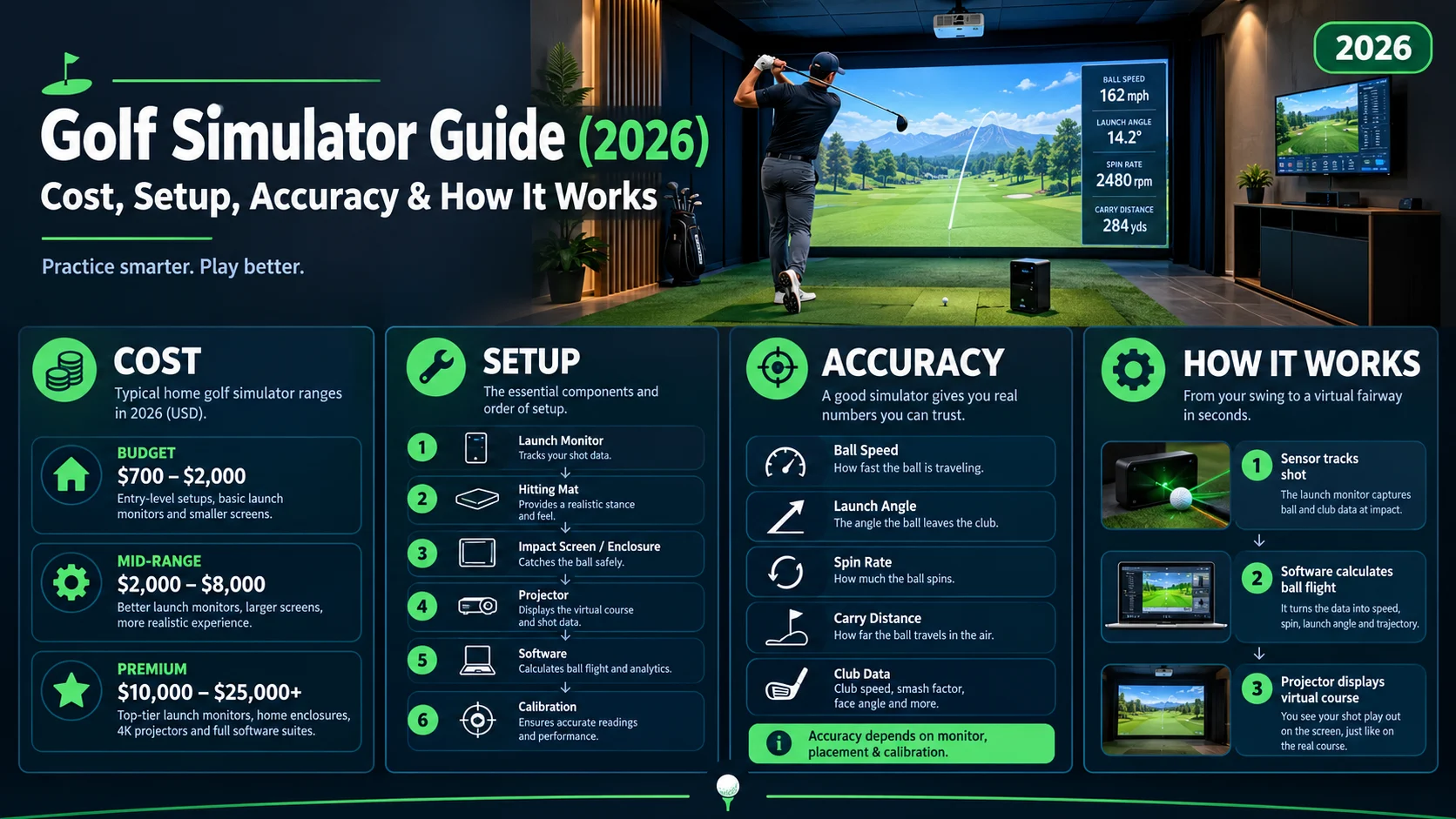
A golf simulator uses cameras, radar, or other launch-monitor technology to track your swing and ball flight, then recreates the shot digitally on a virtual course. It lets golfers practice, play famous courses, analyze performance, and improve indoors without needing a full-size golf course.
A good golf simulator can turn a spare room, garage, basement, or commercial studio into a year-round golf environment. The real value is not just playing virtual golf it is seeing why the ball flies the way it does and using that information to improve your swing.
What Is a Golf Simulator?
A golf simulator is an indoor golf system that combines a launch monitor, hitting area, projector or display, computer software, and impact screen to recreate the experience of playing golf.
When you hit a ball, the simulator measures information such as:
- Ball speed
- Club speed
- Launch angle
- Spin
- Carry distance
- Total distance
- Ball direction
- Club path
- Face angle
- Shot shape
Depending on the system, sensors may use radar, high-speed cameras, infrared technology, or a combination of technologies.
The data is then processed by simulator software and displayed on a screen, allowing you to see your virtual ball flight almost immediately.
Golf Simulator at a Glance
| Feature | Golf Simulator |
|---|---|
| Main purpose | Practice and virtual golf |
| Core technology | Radar or camera-based launch monitoring |
| Can play courses | Yes, depending on software |
| Swing analysis | Yes |
| Indoor use | Yes |
| Practice year-round | Yes |
| Space required | Varies by setup |
| Suitable for | Beginners to advanced golfers |
| Main equipment | Launch monitor, mat, screen, projector/software |
How Does a Golf Simulator Work?
The process is surprisingly simple.
Swing → Ball Impact → Sensors Track Data → Software Calculates Shot → Virtual Ball Flight
When you hit the ball, the launch monitor captures key measurements. The simulator software uses those measurements to calculate the trajectory and display the result on a virtual golf course or practice range.
For example, if you hit a driver with a certain combination of club speed, launch angle, and spin, the system estimates how that shot would travel outdoors.
The quality of the experience depends heavily on the launch monitor, software, setup, lighting, calibration, and hitting conditions.
What Do You Need for a Golf Simulator?
A complete golf simulator does not necessarily have to be complicated, but several components work together.
1. Launch Monitor
This is the heart of the system.
A launch monitor tracks the golf shot and provides the data used by the simulator software.
Some models sit behind the golfer, while others are positioned beside or in front of the hitting area.
2. Golf Hitting Mat
A quality mat provides a realistic surface for hitting shots while protecting the floor underneath.
For frequent practice, look for a mat with enough thickness and cushioning to reduce harsh impact on your joints and wrists.
3. Impact Screen
The impact screen catches the golf ball while displaying the virtual course.
A good screen needs to be durable enough for repeated shots and suitable for the projector being used.
4. Projector or Display
A projector creates the large virtual golf image on the impact screen.
Some compact systems can use a television or monitor, but a projector and impact screen generally create a more immersive simulator environment.
5. Computer or Compatible Device
Simulator software needs a device capable of running it.
The required specifications depend on the software and graphical quality you want.
6. Simulator Software
Software provides the virtual golf environment.
Depending on the platform, you may get:
- Virtual golf courses
- Driving ranges
- Practice games
- Multiplayer modes
- Shot statistics
- Swing analysis
- Skills challenges
How Accurate Are Golf Simulators?
Modern golf simulators can provide highly useful shot data, but accuracy is not automatically guaranteed simply because a system is expensive.
Accuracy depends on several factors:
- Quality of the launch monitor
- Sensor positioning
- Calibration
- Lighting
- Ball quality
- Club markings, when required
- Hitting location
- Indoor room dimensions
- Software calculations
- Correct installation
Camera-based systems can directly observe aspects of the club and ball at impact, while radar systems use tracking technology to measure or calculate shot characteristics.
For serious practice, consistency is often just as important as raw numbers. A golfer needs reliable measurements that allow them to identify changes in their swing.
Can a Golf Simulator Improve Your Game?
Yes, a simulator can become a powerful practice tool because it provides immediate feedback.
Instead of simply watching where the ball lands, you can examine what happened at impact.
For example:
Ball goes right → Check face angle and club path → Identify the pattern → Make a swing adjustment → Hit another shot
This feedback loop can make practice more purposeful.
A golfer can also track whether changes in technique are actually producing changes in ball flight.
What Can You Practice?
A simulator can be useful for practicing:
- Driver shots
- Iron shots
- Wedges
- Distance control
- Chipping
- Shot shaping
- Draws and fades
- Club gapping
- Consistency
- Course strategy
Putting is more complicated because the quality of the experience depends heavily on the simulator’s hardware and software.
Golf Simulator vs Driving Range
| Feature | Golf Simulator | Driving Range |
|---|---|---|
| Indoor practice | Yes | Usually no |
| Weather independent | Yes | No |
| Shot data | Extensive on capable systems | Varies |
| Play virtual courses | Yes | No |
| Real outdoor environment | No | Yes |
| Practice convenience | High | Depends on location |
| Ball flight feedback | Digital | Real |
| Course simulation | Yes | No |
A simulator and driving range are not necessarily competitors. They can complement each other.
A range provides real outdoor ball flight, while a simulator can provide controlled practice, detailed measurements, and convenient access.
How Much Does a Golf Simulator Cost?
The cost varies dramatically depending on the equipment, room, display, launch monitor, software, and installation.
A basic setup can be relatively affordable, while a premium home installation can become a significant investment.
Typical Golf Simulator Cost Categories
| Setup | What You May Get |
|---|---|
| Basic | Launch monitor + mat + net/display |
| Mid-range | Better launch monitor + screen + projector |
| Premium | High-end launch monitor + enclosure + projector + computer |
| Commercial | Professional hardware, software, room construction and installation |
The important point is that you do not need the most expensive simulator to start practicing indoors.
Choose the system around your actual goals rather than paying for features you will never use.
How Much Space Do You Need for a Golf Simulator?
Space requirements depend on your height, swing, equipment, simulator configuration, and whether the system is designed for right- and left-handed players.
You generally need enough room for:
- Full driver swings
- Comfortable stance
- Safe club movement
- Ball travel into the screen
- Adequate ceiling clearance
- Projector placement
- Screen and enclosure
Why Ceiling Height Matters
Ceiling height is one of the most overlooked issues when building a home simulator.
A golfer may have enough floor space but still struggle with a low ceiling when swinging a driver.
Before buying equipment, physically test your full swing in the intended room if possible.
Do not buy the simulator first and measure the room afterward.
Home Golf Simulator Setup
A home simulator can be installed in several locations.
Garage
A garage is popular because it often provides enough length and can accommodate a large screen.
The downside is that temperature, moisture, storage, and ceiling height may require additional planning.
Basement
A basement can provide a dedicated golf environment with fewer distractions.
The biggest concern is usually ceiling clearance.
Spare Room
A spare room can work if the dimensions allow a full swing.
Retractable screens and compact launch monitors can make the room more flexible.
Dedicated Golf Room
For serious golfers, a dedicated room can provide the most immersive experience.
It can include:
- Permanent enclosure
- Large impact screen
- High-quality projector
- Premium launch monitor
- Artificial turf
- Golf storage
- Seating
- Lighting
- Sound system
Who Should Buy a Golf Simulator?
A simulator can make sense for different types of golfers.
Beginners
Beginners can use a simulator to understand basic ball flight and learn how different swing movements affect the shot.
Experienced Golfers
Experienced players can use detailed data to identify patterns in their swing and track progress.
Busy Golfers
If you cannot regularly reach a golf course or driving range, an indoor setup can make practice much more convenient.
Golf Coaches
Golf instructors can use simulator data as another source of feedback during lessons.
Families and Entertainment
Some simulator systems also provide games and multiplayer modes, turning the setup into more than a practice station.
Golf Simulator Benefits
The biggest advantage is convenient, measurable practice.
Year-Round Golf
Rain, extreme temperatures, and darkness do not have to stop your practice session.
Immediate Feedback
You can see information about the shot immediately instead of guessing what happened.
Course Practice
Virtual courses allow golfers to practice decision-making and course strategy without physically traveling to a course.
Distance Control
Launch data can help golfers build a more reliable understanding of how far each club travels.
Entertainment
A simulator can also become a social space where friends compete in virtual rounds and golf games.
Golf Simulator Limitations
A simulator is not exactly the same as playing outdoors.
It Cannot Fully Recreate Outdoor Golf
Wind, uneven lies, natural turf, changing weather, and real environmental conditions are difficult to reproduce perfectly indoors.
Setup Can Be Expensive
A quality permanent installation can cost substantially more than simply visiting a driving range.
Space Can Be a Problem
A room may look large enough until you attempt a full driver swing.
Data Can Be Misleading
Numbers are useful only when the equipment is correctly installed and the golfer understands what they mean.
More data does not automatically equal better golf.
How to Choose a Golf Simulator
Before buying, answer these questions:
What Is Your Main Goal?
If you mainly want entertainment, you may prioritize graphics and course selection.
If you want serious practice, prioritize launch-monitor performance and useful shot data.
How Much Space Do You Have?
Measure:
- Room length
- Room width
- Ceiling height
- Hitting position
- Screen distance
- Projector location
Do You Need Left-Handed Compatibility?
If multiple golfers will use the simulator, check whether the system works comfortably for both right- and left-handed players.
Do You Want Portable or Permanent?
A portable setup is easier to move and store.
A permanent installation can provide a more polished and immersive experience.
What Software Do You Want?
Course libraries, multiplayer features, practice modes, graphics, subscriptions, and compatibility can vary considerably.
Check the software ecosystem before purchasing the hardware.
Common Golf Simulator Buying Mistakes
Buying before measuring the room: The most expensive simulator is useless if you cannot swing comfortably.
Choosing hardware based only on price: Cost alone does not tell you whether a system fits your goals.
Ignoring software: The launch monitor may be excellent, but the overall experience also depends on compatible software.
Overlooking installation: Projector position, lighting, screen distance, and sensor placement can affect the experience.
Chasing numbers instead of improvement: Data should help answer questions about your golf game not become the entire purpose of practice.
Are Golf Simulators Worth It?
The value of a golf simulator depends on how often you use it and what you want from it.
For someone who practices frequently, wants measurable feedback, or has limited access to outdoor golf, an indoor simulator can provide substantial convenience.
For someone who rarely plays or has very limited space, visiting a simulator facility or driving range may make more sense than building a permanent system.
The key question is not simply:
“How expensive is the simulator?”
It is:
“How often will I actually use it?”
A moderately priced system that gets used several times a week can be more useful than a premium setup that sits unused.
Frequently Asked Questions
What is a golf simulator?
A golf simulator is an indoor system that tracks a golf shot using launch-monitor technology and recreates its flight digitally on a screen or display.
How much does a golf simulator cost?
Costs vary widely. Basic systems can be relatively affordable, while premium home installations involving high-end launch monitors, projectors, enclosures, computers, and room modifications can cost substantially more.
Can you play a real golf course on a simulator?
Yes. Many simulator platforms offer virtual versions of golf courses, although available courses depend on the specific software.
Can a golf simulator track swing speed?
Many modern launch-monitor systems can measure club speed along with other club and ball data. Exact measurements depend on the system.
Do golf simulators work with real golf balls?
Many systems are designed to work with real golf balls, although some setups may recommend specific balls or require special conditions.
How much ceiling height is needed for a golf simulator?
There is no single height that works for every golfer. Your height, swing, club length, hitting position, and room configuration all matter. Always test a full swing before installing the system.
Can beginners use a golf simulator?
Absolutely. Beginners can use simulator feedback to learn how different swings affect ball flight and gradually develop consistency.
Is a golf simulator better than a driving range?
They serve different purposes. A simulator offers convenient indoor practice, shot data, and virtual courses, while a driving range provides real outdoor ball flight and environmental conditions.
Final Thoughts
A golf simulator is more than a virtual golf game. When properly installed and used with reliable launch-monitor technology, it can become a practical combination of practice tool, swing-analysis system, virtual golf course, and entertainment space.
The best setup depends on your space, budget, golfing goals, desired data, software preferences, and how frequently you will use it.
Before buying, focus on the fundamentals: measure the room, understand the launch monitor, check software compatibility, and choose a system that matches the way you actually play and practice golf.

Emily Parker is a sports journalist at SportsOrbitX.com with a passion for covering cricket, tennis and major international sporting events. She is committed to producing clear, reliable and engaging content for sports enthusiasts worldwide.